MySpot Carrier
- 4.1
- Rating
- 100.00K
- Installs
- Free
- Price

 Analysis by App-foxy
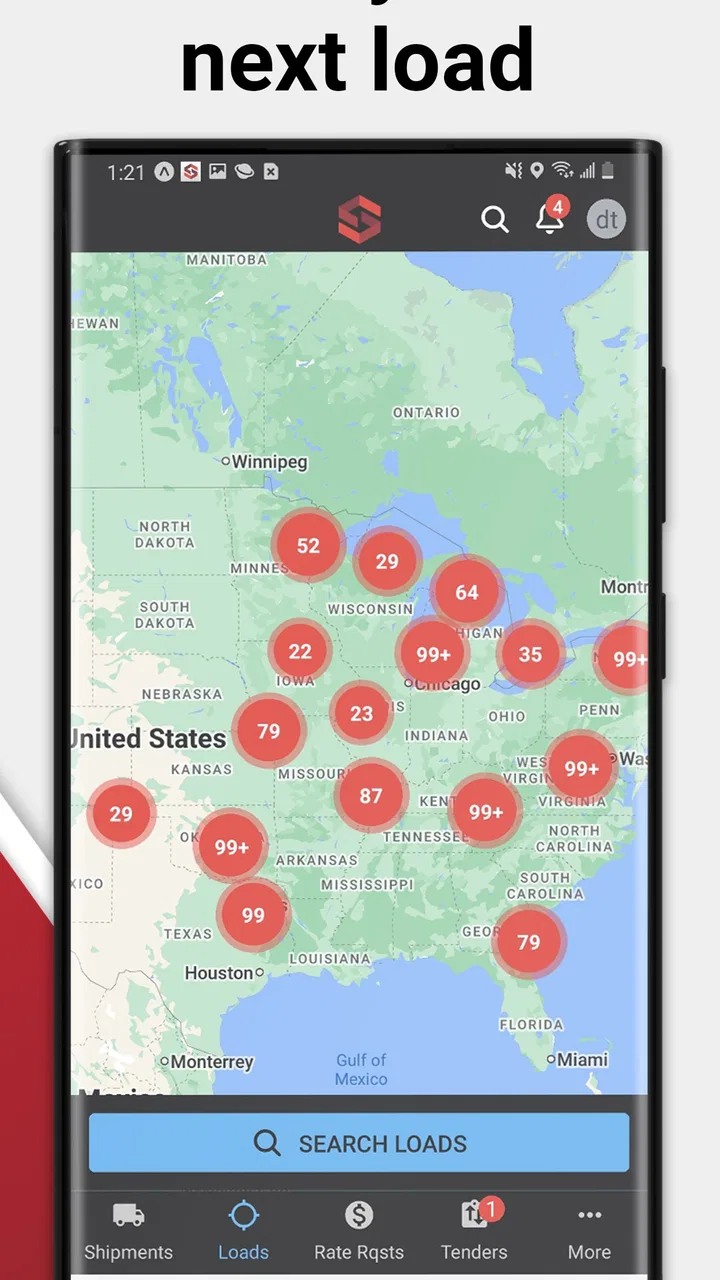
For a carrier, a load board is only useful when it fits the rhythm of the road. That is where MySpot Carrier makes a practical first impression. This free Auto & Vehicles app from Red Technologies, LLC is built around finding and managing loads, sending proof of delivery, and keeping location information current while moving between stops. I see it as a work tool rather than a general driving companion: its value depends on how smoothly it supports the moments between dispatch, pickup, delivery, and paperwork.
What makes the experience interesting is its dependence on connectivity. The app is most helpful when a driver has a usable mobile connection and can exchange current information without returning to a desk. A load board that cannot refresh at the right time is frustrating, while a delivery workflow that cannot send a document when the job is finished can create extra work. My experience with this kind of tool is that the app itself matters, but the quality of the connection and the driver’s habits matter almost as much.
MySpot Carrier has earned a 4.5 average from around 2.9 thousand ratings, with more than 100 thousand installs. Those figures suggest that it has found a real audience among carriers, but they do not make it a universal fit. The important question is whether your daily work actually matches its focused purpose.
You May Also Like

 Google Keep - Notes and lists
Google Keep’s Quiet Growth Shows the Appeal of Simpler Notes
As mobile work gets busier, Google Keep keeps winning a simple contest: capture a thought quickly, find it later, and get on with the day.

 Blood Strike: 2.5 Anniversary
Blood Strike’s Loadouts Turn Every Drop Into a Tactical Gamble
A close look at Blood Strike’s custom loadouts: how fast access to signature weapons reshapes its battle royale rhythm, rewards preparation, and narrows the gap between fights.

 Pandora - Music & Podcasts
Pandora’s Music Is Easy to Start, but Harder to Recover
Pandora’s strength is its low-effort path from a seed to a station. Its weak spot is how much confidence it asks you to place in connection, setup, and quiet recovery.

 8 Ball Pool
 Is Built on Rivalries, Rematches, and Routine
A close look at the rivalries, rematches, shared routines, and unanswered safety questions that turn a quick pool match into a persistent mobile community.

 Samsung Music
’s Quiet Strength Is Playing What You Already Own
Its reach comes less from spectacle than from dependable access to a personal library. That simplicity is both the app’s strongest retention engine and its ceiling.

 AccuWeather: Weather Radar
AccuWeather Review: A Quick, Clear Forecast for Everyday Decisions
For everyday plans, the best forecast is the one you can understand quickly. AccuWeather makes rain timing, radar, and local conditions easy to act on, with a few trade-offs.
More From Our News Desk



How MySpot Carrier fits a carrier’s working day
I look at MySpot Carrier as a tool that earns its place through the transitions in a driver’s day, not by demanding constant attention. In this section, I’m focusing on how a carrier can move from checking possible work to closing out a delivery, while keeping decisions and handoffs manageable. The key is choosing deliberate moments to use the app, which leads into the practical flow that follows.
Starting with loads instead of paperwork
The central appeal is straightforward: I can approach load searching and load management from the same mobile tool used during the workday. That is more convenient than relying entirely on phone calls, scattered messages, or a browser session on a laptop. When I am already away from the office, having the load board close at hand can reduce the number of steps between checking available work and deciding what deserves attention.
That does not mean every load is automatically a good choice. A mobile load board is best treated as a decision aid, not as a replacement for judgment. Before committing, I would still compare the route with my current position, check whether the timing is realistic, and consider the practical cost of reaching the pickup. The app can make information easier to reach, but it cannot remove the carrier’s responsibility to evaluate the job.
One useful habit is to separate “interesting” loads from “ready to accept” loads. A quick glance while parked may help identify possibilities. A proper review should happen before moving again, with enough time to confirm the route and the delivery expectations. This distinction is especially important because connectivity can make information appear immediately available, even when the driver has not yet had time to think through the consequences.
Why location updates matter on the road
The location-update function gives the app a more active role than a simple board of listings. A carrier’s position can affect which work is relevant, and keeping that information current can make the exchange between driver and load manager more useful. I would update location at sensible points in the trip rather than treating it as something to tap constantly.
For example, after completing a delivery, I would take a moment in a safe parking area to review the next opportunity and update my position. That creates a cleaner transition from one job to the next. Doing it while driving would undermine the very efficiency the app is supposed to provide. The best workflow is therefore not “use the app every minute,” but “use it deliberately at operational checkpoints.”
There is also a privacy and battery trade-off whenever location is part of a mobile work process. I would be comfortable using location-related tools when they directly support dispatching, but I would avoid unnecessary interaction and review the device’s normal settings if the phone begins behaving differently. The app’s usefulness comes from relevant location information, not from constant attention.
Submitting proof of delivery without creating a second job
Proof of delivery is one of the features that can save time after a successful drop-off. Instead of treating the document as a separate office task, I can make it part of the delivery routine. The practical advantage is not just speed; it is reducing the chance that a paper, photograph, or confirmation gets forgotten once the truck is moving again.
My preferred routine would be simple: finish the handoff, check that the document is readable, submit it while parked, and then verify that the load record reflects the completed step. That last check is easy to skip, but it is valuable. A blurry image or an interrupted upload can leave the driver believing the task is finished when the recipient still needs the document.
This is where a strong connection makes a noticeable difference. A clear submission process is helpful, but the moment of sending still depends on communication between the phone and the service. I would not leave the delivery location until I had enough confidence that the submission went through, unless safety or site rules required me to move first.
Connectivity changes the experience
MySpot Carrier is most comfortable in places where the phone can communicate reliably. In a busy yard, an urban delivery area, or a rest stop with stable service, checking a load and sending a document can feel almost effortless. The same workflow becomes more uncertain in remote areas, enclosed facilities, or locations where the signal changes from one moment to the next.
That does not make the app unsuitable for long-haul work, but it does change how I would use it. I would check important load details before entering a weak-signal area, keep the relevant information visible while parked, and avoid assuming that a pending action has completed merely because I tapped a button. Connectivity should be treated as part of the operating environment, just like traffic, weather, and access to safe parking.
Mobile use: helpful, but not a substitute for planning
The phone format is the app’s biggest strength and its most obvious limitation. A driver can work from the cab, at a shipper, or after a delivery without carrying a separate computer. That mobility is valuable for independent carriers and small operations where the person driving may also be handling the administrative side of the load.
At the same time, a phone screen is not the ideal place for extended comparison. If I were reviewing several routes, balancing multiple stops, or trying to organize a full day of work, I would prefer a larger screen or a separate planning process. MySpot Carrier is better at quick operational decisions than at replacing a complete transportation-management workspace.
This distinction helps identify the right user. A solo carrier who needs to check work, manage an active load, update a position, and send delivery documentation may find the mobile design genuinely useful. A dispatcher coordinating a large fleet may need broader visibility and more extensive controls than a focused carrier app is designed to provide.
A realistic day with the app
Imagine finishing a morning delivery and parking before leaving the customer’s property. I would open the load board, look for work that makes sense from the current area, and avoid accepting anything until the timing and destination fit the truck’s plan. Once a load is selected, I would use the app to keep the job organized while moving through pickup and delivery stages.
At the final stop, I would photograph or prepare the proof of delivery according to the normal site process, then submit it through the app while stationary. If the connection were unstable, I would keep the document available and retry from a safer location rather than repeatedly tapping while blocking a loading area. Afterward, I would update the location so the next search reflects the new position.
None of those actions is dramatic on its own. The benefit comes from keeping them together in one repeatable routine. That is the kind of small reduction in friction that can matter over a long working week.
What happens when the connection is unreliable
The most important limitation is not necessarily a missing button; it is the uncertainty created when a network action is interrupted. A load may not refresh at the moment I expect, a location update may take longer to register, or a proof-of-delivery submission may need another attempt. I would plan around that possibility instead of treating the phone as an always-available office.
My recovery approach would be conservative. First, I would stop in a safe place and check whether the action visibly completed. Then I would avoid creating duplicates, especially with documents or repeated status changes. If the connection returns, I would confirm the current record before trying again. This kind of patience is more useful than rapidly repeating the same action and later discovering that several attempts were processed.
Drivers should also protect the information they need during a weak-signal stretch. Before entering a rural route or a large facility, I would review the active load and note the key details in a permitted, practical way. I would not assume that every part of the workflow will remain available without communication. The app’s design is centered on connected activity, so preparation is part of using it well.
Keeping mobile data use sensible
For most carriers, the concern is not just whether the app works, but whether it behaves responsibly during a long day of mobile use. I would use Wi-Fi when it is trustworthy and convenient for larger updates, while reserving cellular service for the moments that matter on the road. More importantly, I would avoid repeatedly refreshing the board out of habit.
A better pattern is to check at meaningful points: before leaving a delivery area, after reaching a new region, or when a planned load changes. That gives the app a clear operational purpose and reduces needless screen time. It also helps the driver focus on driving rather than turning every quiet moment into another search.
Document handling deserves the same care. I would prepare a readable proof of delivery, submit it once, and verify the result instead of sending several copies. This is both a data-conscious habit and a cleaner record-keeping practice. If a document is difficult to capture, improving the photo before submission is more sensible than relying on repeated uploads.
Where it is stronger than the usual alternatives
Compared with phone calls alone, MySpot Carrier offers a more direct way to review available work and keep load-related actions connected to the driver’s current situation. Compared with paper notes, it brings location updates and proof-of-delivery submission into the same mobile workflow. Compared with using a general browser, a dedicated carrier app can feel more natural during short operational moments because the experience is focused on the work at hand.
Those comparisons are not absolute victories. A phone call may still be better when a situation is unusual and needs immediate explanation. Paper can be a useful temporary backup when a device or connection is unreliable. A browser or larger dispatch system may be better for detailed planning and managing many loads at once. I would choose the app as a practical front line for mobile carrier work, not as the only tool in every operation.
Who should use it and who should look elsewhere
I think MySpot Carrier is a good match for independent drivers, small carrier teams, and anyone who needs to handle load activity away from a desk. It is particularly appealing if your routine includes frequent transitions between pickup, delivery, location updates, and proof-of-delivery tasks. The free price also makes it easy to try without turning the decision into a major software commitment.
I would be more cautious if your main need is advanced fleet administration, deep route analysis, or a broad office dashboard. The app’s focused carrier role may not cover every requirement of a larger logistics operation. It may also be a poor fit for someone who rarely works from a mobile device or who expects every function to remain dependable in areas with little connectivity.
The age rating is Everyone, which fits the app’s professional purpose, and it runs on Android devices using version 7.0 or later. The current version is 2.11.16, so I would keep the app updated through the normal store process and make sure the phone itself is suitable before building a work routine around it.
My final connectivity verdict
After looking at the complete workflow, I see MySpot Carrier as a useful connected work companion rather than a complete replacement for dispatch software, careful planning, or backup procedures. Its strongest moments happen when I am parked, have a dependable connection, and need to move quickly from load discovery to load management or delivery documentation.
The app earns its place by bringing several carrier tasks into a mobile setting. The trade-off is that the driver must work intelligently around network interruptions, screen limitations, and the need to verify important actions. That is not a reason to dismiss it; it is the condition for using it responsibly.
My recommendation is simple: if you are a carrier who wants a free, focused way to manage loads, submit proof of delivery, and keep location information current from the road, I would give it a serious try. I would pair it with sensible planning and a backup habit for weak-signal moments. For a large fleet or a user seeking an all-in-one logistics platform, another option may be a better primary system, but for mobile carrier work, MySpot Carrier offers a focused and practical approach.
Red Technologies, LLC has kept the concept centered on the tasks that matter during a haul. In my view, that focus is its main advantage: when the connection is available and the driver uses the app at the right moments, it can turn several scattered chores into a more manageable routine.
FAQs for MySpot Carrier
01What is MySpot Carrier and what does it do?
MySpot Carrier is a logistics management app designed for carriers to streamline their operations. It offers features like real-time tracking, route optimization, and task management, ensuring efficient delivery processes. It helps carriers manage shipments, communicate with drivers, and improve overall productivity, making it an essential tool for logistics professionals.
02Is MySpot Carrier available for both Android and iOS?
Yes, MySpot Carrier is available for both Android and iOS devices. Users can download the app from the Google Play Store or the Apple App Store, ensuring compatibility across a wide range of smartphones and tablets. This cross-platform availability allows users to seamlessly integrate the app into their existing workflow.
03What are the key features of MySpot Carrier?
MySpot Carrier boasts several key features including real-time GPS tracking, route optimization, task scheduling, and driver communication tools. These features are designed to enhance operational efficiency by providing carriers with the tools needed to manage deliveries effectively, reduce fuel consumption, and improve customer satisfaction through timely deliveries.
04Are there any costs associated with using MySpot Carrier?
MySpot Carrier offers a range of subscription plans to suit different business needs. While the app can be downloaded for free, certain advanced features may require a paid subscription. Users should check the app’s pricing details in the respective app store to understand the costs involved and choose a plan that best fits their requirements.
05How secure is MySpot Carrier in handling sensitive data?
MySpot Carrier prioritizes user data security by implementing advanced encryption protocols and secure server communications. The app ensures that all sensitive information, such as delivery details and personal data, is protected against unauthorized access. Regular updates and security patches are also provided to maintain a high level of security.
Pros
- User-friendly interface enhances navigation.
- Real-time tracking boosts efficiency.
- Customizable notifications for updates.
- Multi-language support broadens accessibility.
- Secure data encryption ensures privacy.
Cons
- Limited offline functionality.
- Occasional connectivity issues.
- Subscription required for premium features.
- Battery-intensive during prolonged use.
- No integration with third-party apps.

MySpot Carrier
Gallery